肖兴来个人博客
案例1.登录谷歌的Antigravity,显示
该网页无法正常运作
localhost 未发送任何数据。
浏览器网址显示:http://localhost:55917/oauth-callback?state=7e1f591b-cb71-43fc-80c4-c6914f901be8&code=4/0ASc3gC0BRvhw521GeLXEM6kx6ZjFPV_KWldRNG1nPq6Zpxxoafgoi53Ur8-GV–Dv9SmZw&scope=email%20profile%20https://www.googleapis.com/auth/cloud-platform%20https://www.googleapis.com/auth/userinfo.email%20https://www.googleapis.com/auth/userinfo.profile%20https://www.googleapis.com/auth/cclog%20https://www.googleapis.com/auth/experimentsandconfigs%20openid&authuser=0&prompt=consent
右键菜单(最快执行)
打开后执行命令
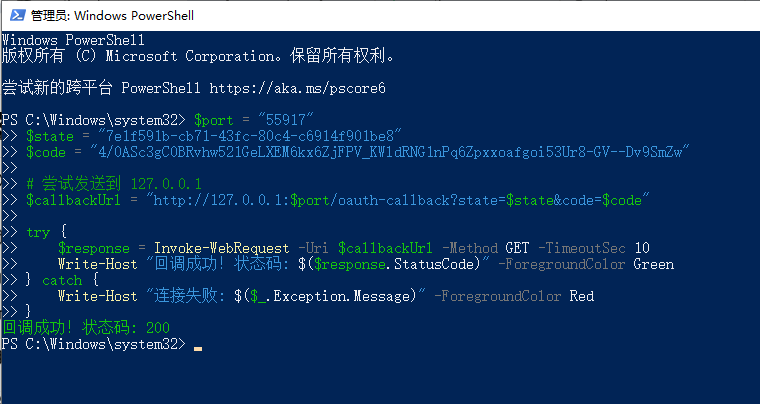
复制粘贴这个命令(右键粘贴):
$port = "55917"
$state = "7e1f591b-cb71-43fc-80c4-c6914f901be8"
$code = "4/0ASc3gC0BRvhw521GeLXEM6kx6ZjFPV_KWldRNG1nPq6Zpxxoafgoi53Ur8-GV--Dv9SmZw"

$callbackUrl = "http://127.0.0.1:$port/oauth-callback?state=$state&code=$code"

try {
    $response = Invoke-WebRequest -Uri $callbackUrl -Method GET -TimeoutSec 10
    Write-Host "回调成功!状态码: $($response.StatusCode)" -ForegroundColor Green
} catch {
    Write-Host "连接失败: $($_.Exception.Message)" -ForegroundColor Red
}
2.http://localhost:52821/oauth-callback?state=a45f5c02-d582-4f94-94ce-3768ba47fd08&code=4/0ASc3gC0_0zzP09q9m7p1zo0gysFcJ-tyR4ohl5ikrfLjmFq5bqo7YLm5yRcehkcUer45pA&scope=email%20profile%20https://www.googleapis.com/auth/cloud-platform%20https://www.googleapis.com/auth/userinfo.email%20https://www.googleapis.com/auth/userinfo.profile%20https://www.googleapis.com/auth/cclog%20https://www.googleapis.com/auth/experimentsandconfigs%20openid&authuser=0&prompt=consent
# 1. 修正端口号,使其与你提供的 URL (52821) 一致
$port = "52821"

$state = "a45f5c02-d582-4f94-94ce-3768ba47fd08"
$code = "4/0ASc3gC0_0zzP09q9m7p1zo0gysFcJ-tyR4ohl5ikrfLjmFq5bqo7YLm5yRcehkcUer45pA"

# 2. 更加安全的 URL 构造方式 (处理特殊字符)
# 使用 .NET 的 Uri.EscapeDataString 方法来对 code 进行 URL 编码
$encodedCode = [Uri]::EscapeDataString($code)
$encodedState = [Uri]::EscapeDataString($state)

# 3. 构造 URL (注意:如果服务端需要 scope 等其他参数,也需要加在这里)
$callbackUrl = "http://127.0.0.1:$port/oauth-callback?state=$encodedState&code=$encodedCode"

# 输出一下构造的 URL 供检查
Write-Host "正在请求: $callbackUrl" -ForegroundColor Cyan

try {
    # 4. 发送请求
    $response = Invoke-WebRequest -Uri $callbackUrl -Method GET -TimeoutSec 10
    Write-Host "回调成功!状态码: $($response.StatusCode)" -ForegroundColor Green
} catch {
    Write-Host "连接失败: $($_.Exception.Message)" -ForegroundColor Red
    # 如果是 HTTP 错误(如 404, 500),打印详细信息
    if ($_.Exception.Response) {
        Write-Host "HTTP 状态: $($_.Exception.Response.StatusCode)" -ForegroundColor Yellow
    }
}